Description
This application presents a slideshow of your pictures.
It searches for the image files in your "My Documents\My Pictures"
directory or your
home directory. The images are displayed in random order. A new image
is selected every 60 seconds. Pressing the spacebar skips to the next
image immediately.
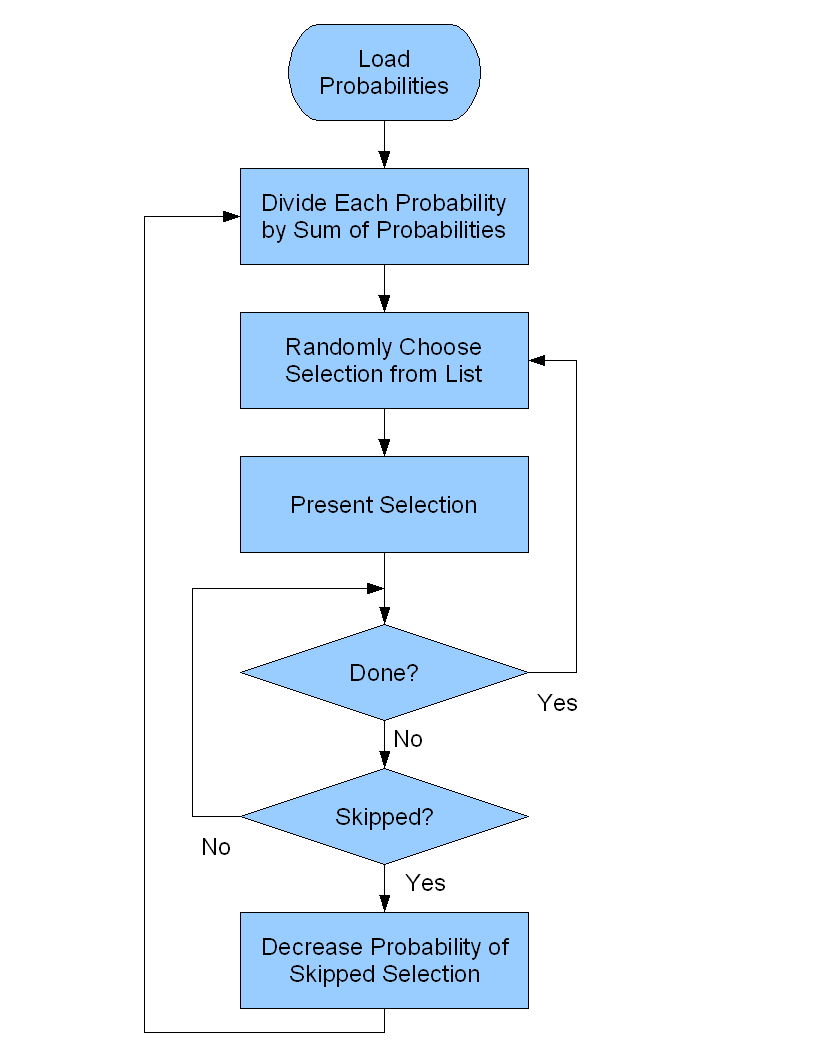
When you skip an image, Skipper uses "skip weighting" to reduce the
probability of the skipped image being randomly selected for display in the
future. This means that as you use it over time, Skipper will eventually
learn which images you do and do not like and show you your favorites more
often. Here is a flowchart showing how skip weighting works:
License
You may use this application under the terms of the Open Source
GNU Affero General Public License v3. The source code is available from
the
SourceForge.net.
Installation
In addition to using the applet at the top of this webpage, you can install
the program as a desktop application by clicking on this link:
skipperfree.jnlp
If it does not install, check that you have
Java installed first,
version 6 or above.
Configuration
The configuration and data files are created in a subdirectory under your
user home directory called ".sloopsoft/skipperfree". These files can be
modified using a plain text editor.

